
01-23-2012, 08:30 PM
|
 |
VideoKarma Member
|
|
Join Date: Jan 2012
Location: New Port Richey, FL
Posts: 1,787
|
|
Quote:
Originally Posted by Phil Nelson

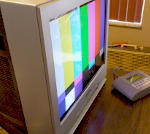
With the camera on a tripod, turn the TV off to take the "good cabinet" photo in normal room lighting. Then turn on the TV (and turn down the room lights if that helps) and take the "good screen" photo. If you didn't jiggle the camera between shots, then you just copy and paste the screen from the good-screen photo into the good-cabinet photo.
I have done this on occasion when, after dozens of attempts, I couldn't get a screen shot that did justice to a particular TV. My camera nearly always turns a B/W screen blue, so sometimes I capture the screen and grayscale it, then paste it back into the same photo.
The difficult part for me is selecting the screen borders so that they smoothly fit into the bezel on the second photo.
Different cameras with different settings may give very divergent results. Some day I'll quit being stubborn and replace my ancient digital camera with one that can take a good screen shot that doesn't need post processing.
Phil Nelson
Phil's Old Radios
http://antiqueradio.org/index.html |
This is where using HDR techniques might actually make it easier.

|