Quote:
Originally Posted by Tubejunke

Now, I think you hit the nail on the head with the oscillator slug needing readjustment. The fine tuning works fine. I am hoping someone familiar with this chassis will direct me to the right slug. I don't want to mess the set up.
|
I don't have a service manual for your TV, but on many sets the oscillator adjuster is inside a little hole on the front of the tuner, something like this diagram (labeled A14).
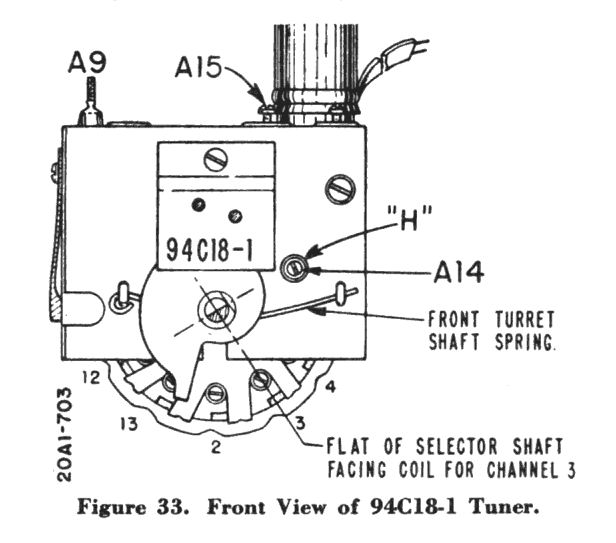
When you turn to a given channel, its adjuster appears through that little hole (labeled H). In your TV, everything would have different labels, of course. First, tune the TV into a signal and set the fine tuner to the middle of its range. Then, using a very thin, non-metallic screwdriver, you turn the adjuster until you have the best picture. Sometimes the adjuster is deep inside that hole, so it helps to use a strong flashlight.
Be careful not to screw the adjuster out too far. On some TVs, the screw will fall out and perhaps get stuck in an inaccessible place.
It's not clear to me that this is the root of your problem, but if you are careful, tweaking the oscillators for channels 3 and 4 can't hurt. If you can already use the fine tuner throughout its range to tune the signal completely in and out in both directions, then adjusting the oscillator won't improve anything. It is just a way to get the tuner (and fine tuner) centered on the correct frequency, if that makes any sense.
Phil Nelson
Phil's Old Radios
http://antiqueradio.org/index.html