
|
|
|
#1
 08-23-2016, 09:49 PM
|
||||
|
||||
|
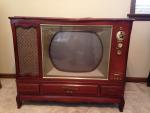
1951 Zenith 16" Porthole
Like many guys, I like to restore more than one set at a time. A friend of mine found this same cabinet in blonde with no chassis. It's near mint and the seller wants to get rid of it so a deal is being made to acquire it. I thought what am I going to do with it? Put the chassis in my mahogany set into the blonde cabinet since it's worth more? Then a few days went by and I found another seller wanting to sell his zenith chassis from a trashed cabinet. So now I'm trying to get a deal on that chassis so I have two complete sets. In the mean time I'm going to go ahead and restore the chassis I have. I'll order parts for my RCA portable I'm working on to save money on shipping by ordering all of the parts together. The chassis is 24H20 with a 16" metal tube, 16GP4 I believe. Like my other 16" I restored, the tube tests bad, but still lights up with a very watchable brightness to it. It also has the seperate power supply chassis. I'll irder all of the parts in the next week or two and get at it.

|
|
#2
08-23-2016, 09:56 PM
|
||||
|
||||
|
Here is a picture with the doors closed. I like the more modern look to this over my other set which is more traditional. It also has very nice piano hinges down both full length doors and thick wood slats in the speak area. This set had many scratches, but good enough not to refinish. Maybe I'll use Howards restore a finish or just som red stain. The thread on how to display your sets has inspired me as I finish my basement in the next year. I decided I'd like to display and have working my better sets, like this one. If I can't make a deal on the chassis, because the seller is deciding on keeping it it not, then I may display it in the blonde cabinet.
|
|
#3
08-23-2016, 09:58 PM
|
||||
|
||||
|
Here is the chassis with the 16" metal coned CRT. I've got a few portholes now, but still yet to come across a 19" porthole.
|
|
#4
08-24-2016, 08:46 AM
|
||||
|
||||
|
Here is the underside of the chassis. I replaced a few of the capacities that I had. It looks pretty much untouched. It's amazing how much lighter this chassis is with a metal coned CRT. But I think they made up for it on the cabinet, as it's super heavy and every piece of wood on it is an inch thick.
|
|
#5
08-24-2016, 09:32 AM
|
|||
|
|||
|
Quote:
|
| Audiokarma |
|
#6
08-24-2016, 07:45 PM
|
||||
|
||||
|
Quote:
24H20 chassis use the 16GP4. The 16EP4 is a 60 degree tube.
|
|
#7
08-24-2016, 09:48 PM
|
||||
|
||||
|
The picture us a little dim, but if you look on the upper right hand if my cabinet tube layout, it lists the 16GP4 for both 24H20 and 24H21 chassis. The schematic for this set (SAMs 120-13) also list it for the 16GP4.
|
|
#8
08-25-2016, 11:28 AM
|
|||
|
|||
|
Quote:
I looked at the Riders #6 coverage for that chassis and it looks like it was the last run of the portholes. They did have to switch to a 70 degree sweep to incorporate the 16 and 19" CRT.
|
|
#9
08-25-2016, 02:15 PM
|
||||
|
||||
|
Quote:
which were similar. If you look at the CRT, It shows 16GP4 OR 19AP4. The 16GP4 is a 70 degree tube, and the 19AP4 is a 66 degree tube.
|
|
#10
08-30-2016, 06:36 PM
|
||||
|
||||
|
Finally got around to placing my order for capacitors and decided to recoat the flyback and clean the dust inside the cage area. The flyback had pieces of the original coating laying at the bottom which I removed. I recoated it with rtv sealant and I'll reinstall the casing once it cures over night.
|
| Audiokarma |
|
#11
08-30-2016, 06:38 PM
|
||||
|
||||
|
Surprisingly, there was also a wire on the flyback that wasn't even soldered on! It was just wrapped around the loop connector. So I cleaned the terminal and soldered it on. I don't know how it worked all these years without a secure connection? It was loose when I touched, just floating.
|
|
#12
09-07-2016, 06:03 AM
|
||||
|
||||
|
Just an update after most of the recapping is done. The hv is low, but I do have a raster with a picture!
|
|
#13
09-07-2016, 01:07 PM
|
||||
|
||||
|
What is your HV reading? Not sure what to make of your pic, is it just dim, or blurry also? What happens when you increase brightness, does the pic bloom, then extinguish? That would be a symptom of low HV. Is your ion trap adjusted properly?
|
|
#14
09-07-2016, 03:27 PM
|
||||
|
||||
|
My hv probe somehow broke so I don't know the voltage. It doesn't bloom when the hv is turned up. The CRT tested bad, but so did my other 16" and it was very watchable. There are a couple more electrolytics I still need to replace because I sinehiw didn't order them with the rest of the cap order. The people brightness is turned all of the way up in the picture.
|
|
#15
09-07-2016, 03:28 PM
|
||||
|
||||
|
I also tried adjusting the ion trap, it's in the brightness position also.
|
| Audiokarma |
 |
| Thread Tools | |
| Display Modes | |
|
|




 Linear Mode

