
|
|
|
|
|
#1
 10-22-2016, 07:35 AM
|
||||
|
||||
|
It never really straightens out. I can get the lines to get about an inch wide, but never straighten any further. I will look at those caps like you suggested and yes I'm using the sams. Thanks!

|
|
#2
10-22-2016, 01:45 PM
|
||||
|
||||
|
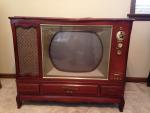
Ok, so I remembered that some sets a horizontal frequency or locking range trimmer on the bottom of the horizontal oscillator transformer. So I pulled the chassis out and underneath a bundle of wires I found this adjustment screw sicking out of the bottom of this transformer. I hooked up all of the cables to the set,and turned it on. Adjusting this screw got this image to finally lock! Now that I have an image, I'll have to figure out why my image is washed out, but at least I have s stable image! I'll post a picture once I get my picture figured out.
Last edited by Radiotronman; 11-17-2016 at 01:50 PM. Reason: Incorrect
|
|
#3
10-22-2016, 03:48 PM
|
||||
|
||||
|
It seems if you turn the set off or change the channel, , the set loses horizontal sync and you have to slide the set out and adjust the trimmer again. Perhaps a 10,000pf mica is leaky around this transformer. Could I replace with a .001 ceramic?
|
|
#4
10-22-2016, 05:13 PM
|
|||
|
|||
|
More likely the hor.osc tube is borderline weak, even though it may test 'good' on a tester.
|
|
#5
10-22-2016, 05:31 PM
|
||||
|
||||
|
Ok, I'll try another, thanks!
|
| Audiokarma |
|
#6
10-22-2016, 09:35 PM
|
||||
|
||||
|
This is the best I can get the video. It's obviously blurry and pretty washed out. I've replaced the video output tube(6AG7) and sprayed the socket in the 1st video tube (6AG7), but it hasn't gotten better.
|
|
#7
10-22-2016, 11:49 PM
|
|||
|
|||
|
Yee-ikes!
 Has anybody played with the IFs? Has anybody played with the IFs?
|
 |
| Thread Tools | |
| Display Modes | |
|
|




 Hybrid Mode
