
|
|
|
#271
 05-17-2015, 07:11 PM
|
||||
|
||||
|
While messing around with the breadboard circuit, it occurred to me to use the scope to look at the phase relationship of the outputs from the quadrature transformer. I was able to adjust the transformer so that they were 90 degrees out of phase, but one output was still lumpy. Perhaps not surprising, considering that the breadboard circuit was crudely built, hanging off the chassis by various foot-long leads.
I disconnected the breadboard circuit, replaced a couple more resistors around the R-Y/G-Y demodulator, and reconnected everything with the old T115 transformer in place. I also dug up a second scope probe so that I could view both outputs at once. Whaddya know, both outputs are nice sine waves! Using the top and bottom adjusters on T115, I got them into a 90-degree phase relationship: 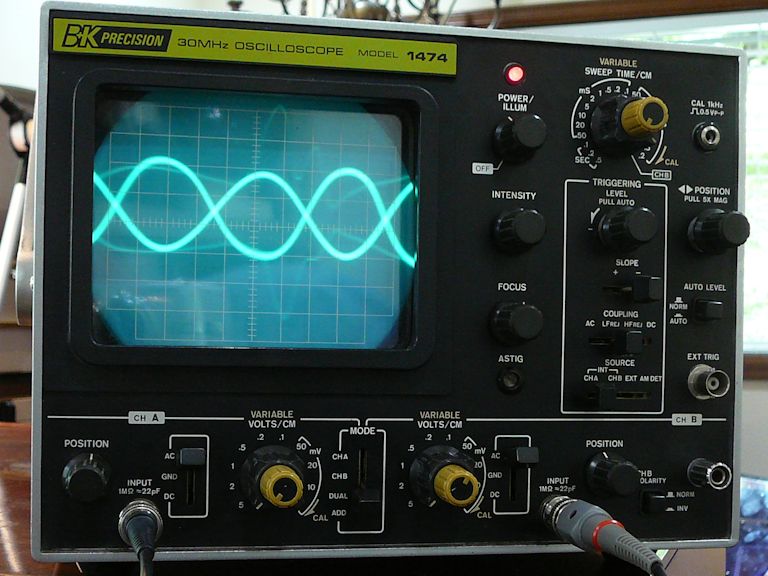 By switching the time base to channel B, I was able to get a purty-good 90-degree circle, as described in my scope manual: 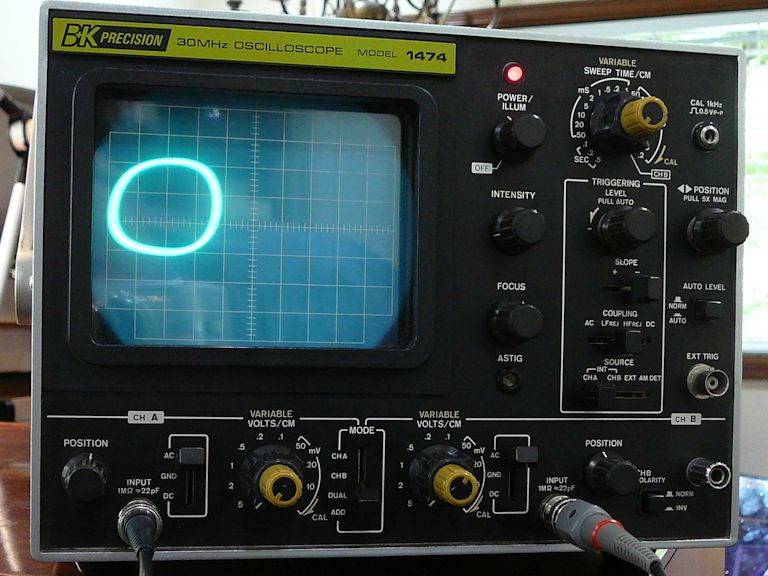  This was all done without reference to other circuits or to what appeared on the screen. When I looked at the screen, I saw these color bands, which can be made to stand still:  Not a correct picture, but my goal here was to confirm that: -- The chroma oscillator works. -- The quadrature transformer passes the 3.58-MHz signal. -- The transformer adjusters affect the phase relationship of its outputs. If these things are indeed working correctly, I'll cross 'em off the list and look elsewhere for solutions. Phil Nelson Last edited by Phil Nelson; 05-17-2015 at 08:43 PM. 
|
|
#272
05-17-2015, 09:19 PM
|
|||
|
|||
|
Looks like the 3.58 osc is quite a bit off freq. The reactance coil adj should be able to bring it back.
|
|
#273
05-17-2015, 11:36 PM
|
||||
|
||||
|
Hmm, adjusting the reactance coil doesn't really improve things. The speed of the rolling horizontal bars changes as I adjust either way, but it hits the end of its travel.
I can look at it some more tomorrow. Phil Nelson
|
|
#274
05-18-2015, 12:42 AM
|
|||
|
|||
|
Is the readout on that radio accurate enuff to tell if the osc is running above, or below 3.58?
The value of that 270pf cap (C213) in the resonant tank could be altered a little bit up or down, depending on which way it needs to go. 10 pf might be a good starting figure.
|
|
#275
05-18-2015, 06:56 PM
|
||||
|
||||
|
No, the radio is not accurate enough to give more than a ballpark idea of frequency. Plus, when I had the breadboard circuit hanging off the chassis and two oscillators (or parts of them) running in near proximity, the radio was more confusing than useful.
Today I found a cheap frequency counter on craigslist, and it showed that you were right once again. The oscillator was running at the wrong frequency, somewhat high. This is as low as I could adjust the frequency using the reactance coil: 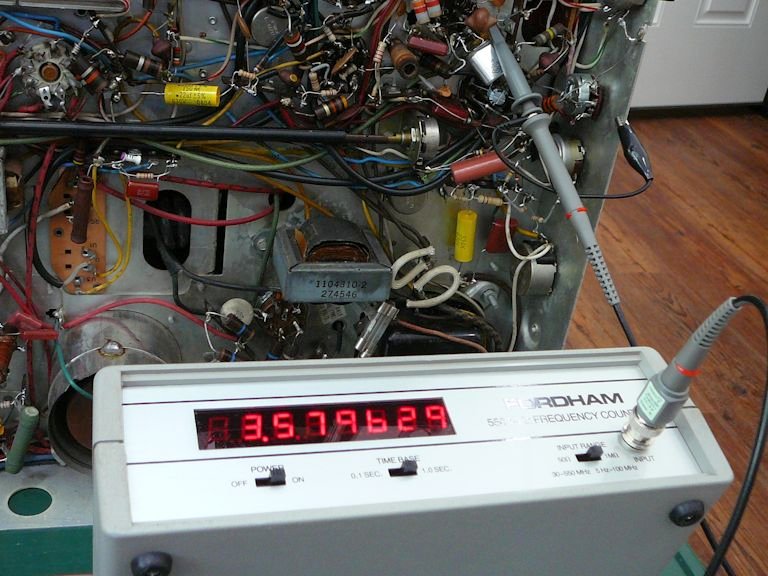 The ideal frequency is 3.579545, not 3.579629. I tried clipping various caps in parallel with the 270-pf cap (C213). Adding a 100-pf cap worked the best:  The system locked on the lower frequency and I got color bars again:  I'm back where I was a while ago, in other words. But at least I got out of the rolling-bars rut! This evening I'll have time to tack the new cap in place and do some more checking. Thanks, Phil Nelson Last edited by Phil Nelson; 05-18-2015 at 08:05 PM.
|
| Audiokarma |
|
#276
05-18-2015, 10:14 PM
|
||||
|
||||
|
Quote:
Cheers,
__________________
Brian USN RET 22YRS (Avionics/Cal) CET-Consumer Repair and Avionics ('88) "Capacitor Cosmetologist since '79" When fuses go to work, they quit!
|
|
#277
05-18-2015, 11:07 PM
|
||||
|
||||
|
This one was $20 from a pawn shop and it has already paid for itself in fun. I was curious to see what frequency I would find in my CTC-11, which has terrific color:
 Let's see, what else can I run around and measure with my new toy? Phil Nelson
|
|
#279
05-19-2015, 02:37 AM
|
||||
|
||||
|
Ramsey Electronics made several frequency counter kits in the late 1970s to early 1980s, and they also had a kit called a "frequency counter calibrator". It was a 3.58 MHz oscillator that you wired into your working color TV set, and it would phase-lock to the TV set's chroma oscillator. You then tuned the set to a network TV show (they were specific about that), and then adjusted the counter to display exactly 3.579545 MHz. It was interesting-all of the networks were within 1 Hz, and some of the local stations were off by several Hz or more.
__________________
Chris Quote from another forum: "(Antique TV collecting) always seemed to me to be a fringe hobby that only weirdos did."
|
|
#280
05-19-2015, 04:34 PM
|
||||
|
||||
|
Quote:
Phil Nelson
|
| Audiokarma |
|
#281
05-19-2015, 07:04 PM
|
||||
|
||||
|
While I had the chassis on the bench, I decided to take another look at the breadboard circuit. It is being powered by the CTC-4 chassis but none of its signal leads are connected. Now I can see that it's oscillating lower than the ideal frequency.
 As before, one output of the quadrature transformer looks irregular and the other is a clean sine wave, when they are connected to a probe one at a time:  It was interesting to connect the two scope channels to the two transformer outputs. When both outputs had some loading, the irregular waveform got more regular. With some adjusting of the bottom and top slugs, I was able to bring them 90 degrees out of phase, as I did before with the TV's native circuit:   This little exercise gave me a better grasp of how the transformer works. The bottom adjuster affects (mostly) the amplitude of one output, while the top adjuster affects (mostly) the phase of the second relative to the first. The closer they came to quadrature, the more the irregular wave seemed to smooth out. I was also able to observe an amplitude peak while adjusting the bottom slug, something that you're supposed to observe with a voltmeter in the service manual's alignment procedure. Tacking a 100-pf cap in parallel with C213 gave me a TV that displays stable color bars (even though all of the colors are wrong), so I guess the oscillator is running in the right ballpark. Phil Nelson
|
|
#282
05-20-2015, 12:16 PM
|
|||
|
|||
|
Phil,
Since you've already done the alignment procedure per the manual, presumably the tint ('hue') control shows some evidence of working when you turn it. - The display looks like possibly one of the two demods is really wonky or maybe not working at all. Assuming the hue control is working, I would try this.. using a cap of .01 - .047 or thereabouts, short out each of the demods in turn, watching to see what the tint control does while one demod is shorted. - At the 12BH7 demod tube V125A, short the plate (pin 1) to ground*. This kills the R-Y signal. On a normally working set, the display will show some colors missing, but with the tint control still functional. Now short the plate of the other (G-Y) channel (pin 6). You should get a different set of colors, and the tint control should still work. - If either channel shows little or no color, and/or the tint control has little or no effect, I would look further into that channel for the problem. - Of course if both channels pass the test, then the wonky-color fault lies somewhere else. - *Or to B+, doesn't matter since it's signal ground. Last edited by old_coot88; 05-20-2015 at 12:20 PM.
|
|
#283
05-20-2015, 02:27 PM
|
||||
|
||||
|
Thanks, that gives me some things to try. I haven't redone the alignment procedure since the latest replacements (which included a couple of resistors on the demodulators).
The tint (hue) control does have an effect. Colors shift around in the bars, but they are never correct. Edit: I still haven't done the alignment, but here are quick photos showing the results of shorting the demodulators. 1. Demodulators normal (nothing shorted). Wrong colors, of course:  2. Demodulator pin 1 shorted:  3. Demodulator pin 6 shorted:  The tint control affects colors in both cases. Gotta run some errands, but I can return to it this evening. Phil Nelson Last edited by Phil Nelson; 05-20-2015 at 04:25 PM.
|
|
#284
05-20-2015, 04:13 PM
|
|||
|
|||
|
On second thought, before doing anything else, check for proper voltages on the 6AG7 demod driver tube V123. If good, check xfmr T114 for continuity on the secondary.
If good, scope the signal coming out of terminals A and D of T114. That's the 3.58 bandpass signal before it's mixed with the 3.58 osc. signal.
|
|
#285
05-20-2015, 06:46 PM
|
||||
|
||||
|
Now that the oscillator is running at the correct frequency, do what I did:
grab a pair of plastic diddle sticks, put one in each core of the quad x-former. Put a mirror in front of the set, so you can see the screen while you twist the diddle sticks. Tweak both cores with a color bar pattern on the screen till you see the correct bars, and make sure the tint control is centered when you do it otherwise you'll end up with not a lot of range when you're done. If you're able to get good bars I'd call it a day, if it looses lock during the procedure zero beat the oscillator again and repeat- remember that the phase detector and local oscillator are linked together, so a change in one affects the other.
__________________
Evolution... 
|
| Audiokarma |
 |
|
|




 Linear Mode

