Videokarma.org

Go Back   Videokarma.org TV - Video - Vintage Television & Radio Forums > Early Color Television

Notices

We appreciate your help

in keeping this site going.
Reply
 
Thread Tools Display Modes
  #1  
Old 01-02-2021, 07:40 PM
etype2's Avatar
etype2 etype2 is offline
VideoKarma Member
 
Join Date: Mar 2010
Location: Valley of the Sun, formerly Silicon Valley, formerly Packer Land.
Posts: 1,624
Quote:
Originally Posted by kvflyer View Post
Nice...
Thank you.
__________________
Reply With Quote
  #2  
Old 01-07-2021, 11:05 PM
etype2's Avatar
etype2 etype2 is offline
VideoKarma Member
 
Join Date: Mar 2010
Location: Valley of the Sun, formerly Silicon Valley, formerly Packer Land.
Posts: 1,624
There was no Rose parade this year, so here, an encore presentation of the 2020 parade.
Four minutes, thirty two seconds into the video, we zoom in so you can watch the vivid saturated colors on full screen. Duration, 10 minutes.

https://videopress.com/v/Dsgtyac5
__________________
Reply With Quote
  #3  
Old 01-16-2021, 07:30 PM
etype2's Avatar
etype2 etype2 is offline
VideoKarma Member
 
Join Date: Mar 2010
Location: Valley of the Sun, formerly Silicon Valley, formerly Packer Land.
Posts: 1,624
Update: The above video (post #451) cannot render the color fidelity of this three strip color film, nor can the Westinghouse H840CK15. Our endeavor is to demonstrate and document 1954 color television technology while this set is operational. One day, there will be an unrepairable failure. Until then, we enjoy the magic from this 67 year old beast.

The next four photos demonstrate the difference in color fidelity between a 6000 X 4000 (downsized here) resolution digital render by a Sony A6300 using manual controls and the same camera shooting video with MP4 quality, 30 FPS, 14.2 BPS. We pulled two frames from the video for this demonstration, beginning with photo, video frame, photo, video frame.

We can edit the look of the digital photo (jpeg) with the camera. The video is another thing having no video editor.

Digital photo.

https://visions4netjournal.com/wp-co...E51E35DFF.jpeg

Video frame.

https://visions4netjournal.com/wp-co...E2343BD07.jpeg

Digital photo.

https://visions4netjournal.com/wp-co...72378304A.jpeg

Video frame.

https://visions4netjournal.com/wp-co...7EC4D0C84.jpeg
__________________

Last edited by etype2; 01-16-2021 at 07:37 PM.
Reply With Quote
  #4  
Old 01-17-2021, 08:44 PM
Tom9589 Tom9589 is offline
VideoKarma Member
 
Join Date: Jan 2013
Location: Stone Mountain, GA
Posts: 484
Why didn't Mike Doyle replace the third 5U4 with a solid state replacement?
Reply With Quote
  #5  
Old 01-17-2021, 11:22 PM
etype2's Avatar
etype2 etype2 is offline
VideoKarma Member
 
Join Date: Mar 2010
Location: Valley of the Sun, formerly Silicon Valley, formerly Packer Land.
Posts: 1,624
Quote:
Originally Posted by Tom9589 View Post
Why didn't Mike Doyle replace the third 5U4 with a solid state replacement?
Mike’s comments:

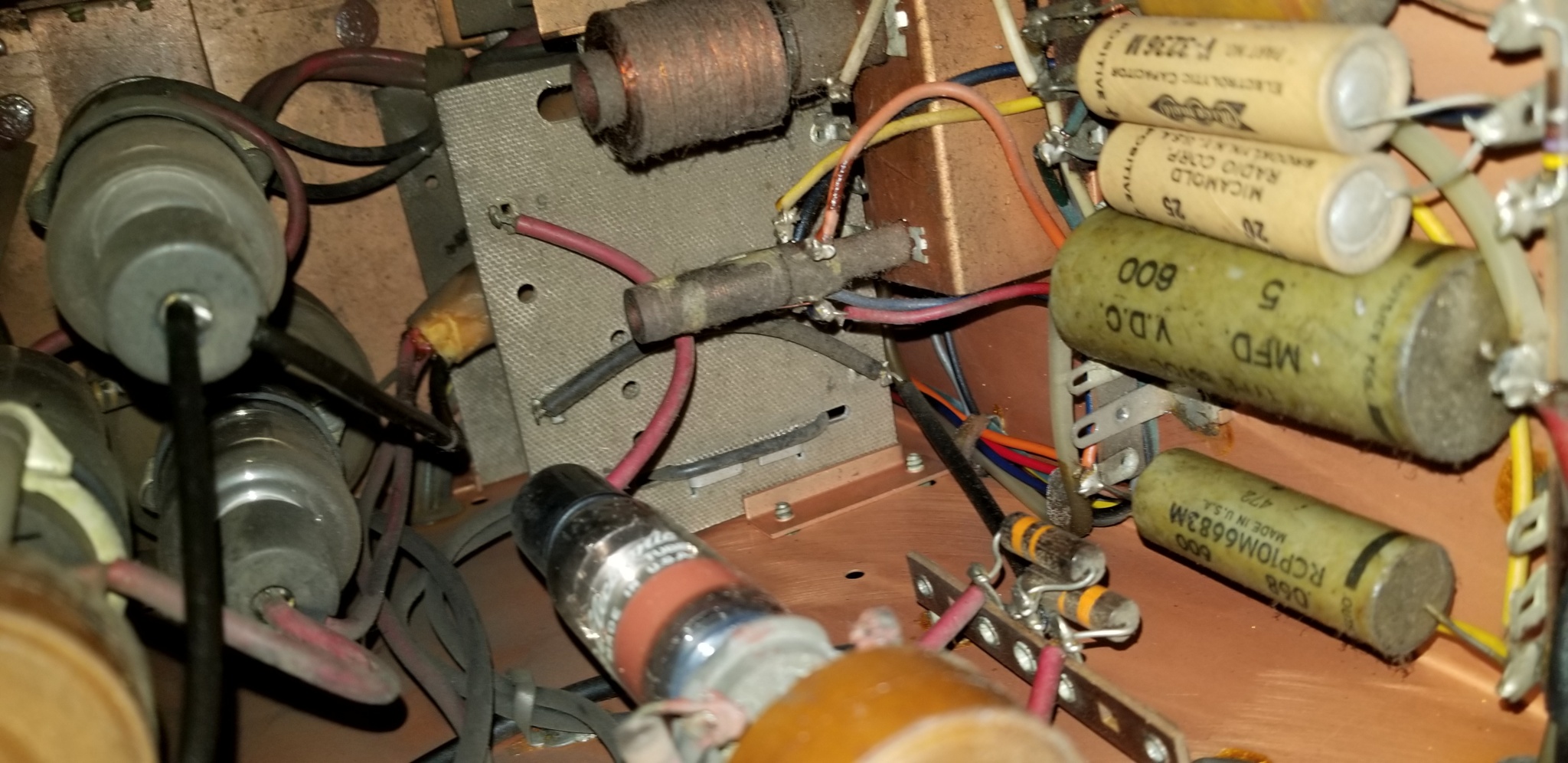
Hi Marshall. Recently I have noticed that the power supply voltages are not stable at the voltages that they need to be at. There are basically 3 voltages supplied here. The Westinghouse prints call them to be 410 VDC and 310 VDC, and 120 VDC. The issue with the variations in voltage are simply design related. The 310 VDC supply is also supporting the High Voltage regulator circuits and the bias on that stage is critical. I was having problems with the High Voltage regulator becoming unstable and causing fluctuations in the high voltage setting. I decided to replace the two 5U4 rectifier tubes that supply the 310 VDC with silicon rectifiers. I added a 300 ohm 50 watt resistor in the system to keep the voltage at 310 VDC since the silicon rectifiers are more efficient than the 5U4’s. I also decided to keep the 5U4 that supplies the 410 VDC since that is mainly for the sweep circuits, and that is all working fine.

Cheers, Mike”
__________________
Reply With Quote
Audiokarma
  #6  
Old 01-17-2021, 09:08 PM
dtvmcdonald's Avatar
dtvmcdonald dtvmcdonald is offline
VideoKarma Member
 
Join Date: Nov 2012
Posts: 1,264
Interesting to see that relay. When I got my CT-100 the switch on the volume control
was jumpered on. It would have been difficult to replace, and the volume control was nice
and quiet so I left it. I use the switch on the Variac (but unplug the set too).
That set was a lot kinder today to red and orange uniforms than it was to the Vikings
with their Q-ish uniforms.
Reply With Quote
  #7  
Old 01-17-2021, 11:26 PM
etype2's Avatar
etype2 etype2 is offline
VideoKarma Member
 
Join Date: Mar 2010
Location: Valley of the Sun, formerly Silicon Valley, formerly Packer Land.
Posts: 1,624
Quote:
Originally Posted by dtvmcdonald View Post
Interesting to see that relay. When I got my CT-100 the switch on the volume control
was jumpered on. It would have been difficult to replace, and the volume control was nice
and quiet so I left it. I use the switch on the Variac (but unplug the set too).
That set was a lot kinder today to red and orange uniforms than it was to the Vikings
with their Q-ish uniforms.
That purple is very difficult to render properly, however my OLED reproduces the color well.
__________________
Reply With Quote
  #8  
Old 01-19-2021, 04:54 PM
dtvmcdonald's Avatar
dtvmcdonald dtvmcdonald is offline
VideoKarma Member
 
Join Date: Nov 2012
Posts: 1,264
Quote:
Originally Posted by etype2 View Post
That purple is very difficult to render properly, however my OLED reproduces the color well.
Its not the color that's the problem ... both my Sony Bravia and the CT-100 do that just fine.

The problem is that that color is one phase of Q, green is the other.
Thus, one gets bad color blur .
Reply With Quote
  #9  
Old 01-19-2021, 06:00 PM
old_tv_nut's Avatar
old_tv_nut old_tv_nut is offline
See yourself on Color TV!
 
Join Date: Jul 2004
Location: Rancho Sahuarita
Posts: 7,745
Quote:
Originally Posted by dtvmcdonald View Post
Its not the color that's the problem ... both my Sony Bravia and the CT-100 do that just fine.

The problem is that that color is one phase of Q, green is the other.
Thus, one gets bad color blur .
But if you sit far enough away, you are not supposed to see the Q blur, according to the original NTSC claims.

Actually, the minimum visual color acuity should be on a blue/yellow axis, but the NTSC choice of the I axis (orange/cyan) worked out well because skin tone is on the I axis and therefore you don't get any Q channel color distortion on the edges of faces. Making Q at 90 degrees to I then puts a mixture of blue and red (purple) variation in the Q channel, and the eye can see the loss of detail in that. It would be interesting to figure out how well things would have worked if NTSC had abandoned the 90 degree relationship of R-Y and B-Y, and put I and B-Y at 90 degrees instead. It would have other implications for the sensitivity of hue to burst phase errors, so not a straight-forward issue.
__________________
www.bretl.com
Old TV literature, New York World's Fair, and other miscellany
Reply With Quote
  #10  
Old 01-18-2021, 08:30 PM
Tom9589 Tom9589 is offline
VideoKarma Member
 
Join Date: Jan 2013
Location: Stone Mountain, GA
Posts: 484
As usual, Mike makes a lot of sense. Thanks, Marshall, for the explanation.
Reply With Quote
Audiokarma
  #11  
Old 01-26-2021, 01:18 PM
etype2's Avatar
etype2 etype2 is offline
VideoKarma Member
 
Join Date: Mar 2010
Location: Valley of the Sun, formerly Silicon Valley, formerly Packer Land.
Posts: 1,624
UPDATE, JANUARY 26, 2021

In our quest to extract more color information from 1954 NTSC color television and continued experimentation with the 1954 Westinghouse H840CK15 with RCA 15GP22 CRT, we realized the need for a pro or semi-pro photo editor. The obvious choice was Photoshop, but I don’t own a PC or laptop, just my friendly iPad Pro 2 with P3 color gamut. Photoshop requires a $10 monthly rental, so we looked elsewhere and found the Affinity Photo app. A one time purchase of $30 and boom, we were in business. I have never used a pro editor, so a learning curve was in order. We can choose from 7 color spaces and 7 color profiles, color channels, transitions, A/V editing and much more. Just what we were looking for.

Much has been said about the 15GP22 extended color gamut phosphors, can we see the extended reds and Kelly greens? We used five favorite screenshots on this test from the movie, Meet Me In St.Lois, broadcast television and the movie, Wizard of Oz. The movies used three strip Technicolor process and the broadcast images were from PBS.

The first image below is a low resolution sample of the images to fit this forum page. This down sized image introduced terrible moire artifacts wich are not present in the originals. The left column images were shot straight out of my Sony A6300, set on s/RGB color space. Should I have chosen a different color space on the camera? The right column show edited images using the Affinity editor. For color management, we used auto channels, auto contrast and auto white balance and chose RGB/16 color space with P3 color profile since my display covers P3 extended color gamut. Three strip Technicolor, P3 color gamut display, will the editor extract the extended color from the NTSC correct color phosphors and can we see extended color?


https://visions4netjournal.com/wp-co...3473A2660.jpeg

If you want to see the full resolution shots of each image, I’ve provided the photos below with commentary. These images are best viewed on an extended color gamut monitor.

First edited image: One of my favorite facial shots because of the color depth and shading and a night shot. The moire is gone. I see more yellow in Dorthy’s face as opposed to the pink tones. The colors are more saturated. The color managed image removed artifacts and noise from the original.

Note. Using the A6300, I’m relying on manual settings viewed on a 3 inch LCD monitor screen attached to the camera body. Not exactly ideal to see color accuracy. We can adjust aperture, shutter speed, focal length, ISO, or white balance, but never get the shot perfect as we see it on the television screen. A tripod and darkened room helps together with filling the camera viewfinder with the television image is best for accurate sensor rendering

Second edited image: This image was rather flat with nice pastels when photographed. The edited version shows extended color depth and saturation. The moire is gone.

Third edited image: Edited version has deeper saturated colors, wider color gamut.

Forth edited image: Source, 4K HDR BLURay on LG OLED. Edited version slightly warmer with deeper color. LG’s OLED out the box preset color profile appears very accurate using ISF PRO DARK ROOM.

Fifth edited image: Same source as forth image. Very close to original with whiter whites. As a novice in photo editing, we just set the mods on auto and let it do the work.

The last image is to show the pixel structure. Yes, low resolution, but not as bad as the first generation GE Portacolor.

Did we learn anything? Yes. Did we see extended colors? Maybe. Deeper saturated colors, improved shading with brighter images in all cases to improve on the 15GP22 low light output. About 86% of the tri-color light energy is blocked by the shadow mask. This specification is from RCA’s own technical paper.

My question is, did the engineers that developed 1954 NTSC color, actually see the full color gamut on an advanced display, or is the specification just mathematical? The phosphors must have been stimulated in some fashion to output light.

https://visions4netjournal.com/wp-co...CDDC5CFB6.jpeg

https://visions4netjournal.com/wp-co...5F671CF708.png

https://visions4netjournal.com/wp-co...0DD760B60.jpeg

https://visions4netjournal.com/wp-co...AECF90E43.jpeg

https://visions4netjournal.com/wp-co...A16502729.jpeg

https://visions4netjournal.com/wp-co...045989779.jpeg

https://visions4netjournal.com/wp-co...C2512D62D.jpeg

https://visions4netjournal.com/wp-co...9082EA07E.jpeg

https://visions4netjournal.com/wp-co...11F960FE3.jpeg

https://visions4netjournal.com/wp-co...0AA928B78.jpeg

https://visions4netjournal.com/wp-co...2E45E1D71.jpeg
__________________

Last edited by etype2; 01-26-2021 at 02:03 PM.
Reply With Quote
  #12  
Old 01-26-2021, 04:07 PM
old_tv_nut's Avatar
old_tv_nut old_tv_nut is offline
See yourself on Color TV!
 
Join Date: Jul 2004
Location: Rancho Sahuarita
Posts: 7,745
I'm afraid you are making a mistake in what you are attempting.

The color range that you can demonstrate in a posted image is dependent on the narrowest colorspace bottleneck that the image passes through. In the past this has often been the viewer's display, but these days most monitors are sRGB (or close), so sRGB wil be the limiting factor. In addition, sRGB is the usual space for jpg images, and the assumed space for most web browsers.
In fact, if you simply copy the digital values of a wider space (such as P3 or Adobe RGB) into an sRGB jpg file for the web, the colors usually will be reproduced with distorted, lower saturation, because most browsers ignore any auxiliary color gamut info in a jpg file that would tell them to convert to the monitor profile. Properly color managed software like Photoshop or Lightroom converts the colors to sRGB before exporting a jpg file.

A correctly color managed program like photoshop takes the image data from your camera, and knowing the color space it is in, translates it to a very wide working space (e.g., Lab), and then translates it from the working space to your monitor profile for viewing, or to the proper output space for your printer or for export to jpg (in that case sRGB).

There is NO possibility to make the NTSC colors show up on anyone else's sRGB monitor. The only thing color management can guarantee is that colors that are within sRGB in the original camera file will be reproduced correctly on a correctly profiled monitor. Colors beyond the sRGB gamut must be moved to fit inside sRGB, as those are the only ones that can be reproduced by an sRGB monitor.

So, no, we cannot see the Kelly greens, but we should be able to see the less saturated colors better.

If you want to share the Kelly greens with someone, they need to have a color managed wider-gamut monitor and viewing software that recognizes the color profile embedded in the file you share (which usually would need to be some other format than jpg).
__________________
www.bretl.com
Old TV literature, New York World's Fair, and other miscellany
Reply With Quote
  #13  
Old 01-26-2021, 04:44 PM
etype2's Avatar
etype2 etype2 is offline
VideoKarma Member
 
Join Date: Mar 2010
Location: Valley of the Sun, formerly Silicon Valley, formerly Packer Land.
Posts: 1,624
Quote:
Originally Posted by old_tv_nut View Post
I'm afraid you are making a mistake in what you are attempting.

The color range that you can demonstrate in a posted image is dependent on the narrowest colorspace bottleneck that the image passes through. In the past this has often been the viewer's display, but these days most monitors are sRGB (or close), so sRGB wil be the limiting factor. In addition, sRGB is the usual space for jpg images, and the assumed space for most web browsers.
In fact, if you simply copy the digital values of a wider space (such as P3 or Adobe RGB) into an sRGB jpg file for the web, the colors usually will be reproduced with distorted, lower saturation, because most browsers ignore any auxiliary color gamut info in a jpg file that would tell them to convert to the monitor profile. Properly color managed software like Photoshop or Lightroom converts the colors to sRGB before exporting a jpg file.

A correctly color managed program like photoshop takes the image data from your camera, and knowing the color space it is in, translates it to a very wide working space (e.g., Lab), and then translates it from the working space to your monitor profile for viewing, or to the proper output space for your printer or for export to jpg (in that case sRGB).

There is NO possibility to make the NTSC colors show up on anyone else's sRGB monitor. The only thing color management can guarantee is that colors that are within sRGB in the original camera file will be reproduced correctly on a correctly profiled monitor. Colors beyond the sRGB gamut must be moved to fit inside sRGB, as those are the only ones that can be reproduced by an sRGB monitor.

So, no, we cannot see the Kelly greens, but we should be able to see the less saturated colors better.

If you want to share the Kelly greens with someone, they need to have a color managed wider-gamut monitor and viewing software that recognizes the color profile embedded in the file you share (which usually would need to be some other format than jpg).
What file format other than jpeg do you recommend? I have a wide range to chose from. (I originally processed in ping, but the file size was large.)
__________________

Last edited by etype2; 01-26-2021 at 05:04 PM.
Reply With Quote
  #14  
Old 01-26-2021, 04:28 PM
old_tv_nut's Avatar
old_tv_nut old_tv_nut is offline
See yourself on Color TV!
 
Join Date: Jul 2004
Location: Rancho Sahuarita
Posts: 7,745
"My question is, did the engineers that developed 1954 NTSC color, actually see the full color gamut on an advanced display, or is the specification just mathematical? The phosphors must have been stimulated in some fashion to output light."

I'm not sure what you mean by "advanced display."
In 1954, the 15GP22 CRTs did display the full NTSC color gamut, and the cameras did produce it.

Your set can also produce the full gamut, but the new catch is that all current sources other than specific wide color gamut (WCG) ones limit the gamut to sRGB in the first place.

To get things really proper for viewing on your set, you need a WCG source of the program material, and a digital to NTSC converter that does the math to convert color space properly. A way to approach this would be to hook up your set to your computer and treat it as a monitor, profiling it with a colorimeter or spectrophotometer just as you would any monitor, then play a WCG source through the computer using software that does the same sort of color management as Photoshop does for stills, converting accurately from WCG source to your set. (I am not familiar with PC movie/video editing software, maybe Adobe Prmier Pro can do this, but I have not used it and don't know.)
__________________
www.bretl.com
Old TV literature, New York World's Fair, and other miscellany
Reply With Quote
  #15  
Old 01-26-2021, 04:56 PM
etype2's Avatar
etype2 etype2 is offline
VideoKarma Member
 
Join Date: Mar 2010
Location: Valley of the Sun, formerly Silicon Valley, formerly Packer Land.
Posts: 1,624
Quote:
Originally Posted by old_tv_nut View Post
"My question is, did the engineers that developed 1954 NTSC color, actually see the full color gamut on an advanced display, or is the specification just mathematical? The phosphors must have been stimulated in some fashion to output light."

I'm not sure what you mean by "advanced display."
In 1954, the 15GP22 CRTs did display the full NTSC color gamut, and the cameras did produce it.

Your set can also produce the full gamut, but the new catch is that all current sources other than specific wide color gamut (WCG) ones limit the gamut to sRGB in the first place.


To get things really proper for viewing on your set, you need a WCG source of the program material, and a digital to NTSC converter that does the math to convert color space properly. A way to approach this would be to hook up your set to your computer and treat it as a monitor, profiling it with a colorimeter or spectrophotometer just as you would any monitor, then play a WCG source through the computer using software that does the same sort of color management as Photoshop does for stills, converting accurately from WCG source to your set. (I am not familiar with PC movie/video editing software, maybe Adobe Prmier Pro can do this, but I have not used it and don't know.)
Affinity seems to be like Photoshop. It recognizes all the color formats and color profiles, many of which I’m unfamiliar with. I can do color (tone) mapping on it, so I think it is meant for pros.

The thing is my, my iPad can display WCG P3 and our OLED TV has P3 color space with a Chrome web browser so we can view my website photos on a large screen. The photos look overly saturated on the (OLED) web front interface, (RGB) but when opened to full resolution, they are displayed in a different color space. (P3)
__________________

Last edited by etype2; 01-26-2021 at 05:01 PM.
Reply With Quote
Audiokarma
Reply


Posting Rules
You may not post new threads
You may not post replies
You may not post attachments
You may not edit your posts

BB code is On
Smilies are On
[IMG] code is On
HTML code is Off

Forum Jump


All times are GMT -5. The time now is 11:26 AM.


Powered by vBulletin® Version 3.8.4
Copyright ©2000 - 2026, Jelsoft Enterprises Ltd.
©Copyright 2012 VideoKarma.org, All rights reserved.