
|
|
|
#61
 10-12-2010, 06:41 PM
|
||||
|
||||
|
Alrighty, I've got one of those Radio Shack variable attenuators on the way. Do you suppose there may be a chance that'll help with the washed out picture or with the buzz... maybe both?
Quote:

|
|
#62
10-12-2010, 07:53 PM
|
|||
|
|||
|
on a DVD or converter box there is a jack that says 'video out" this is the composite video, it is the same as what comes out of the video detector (if the tuner and IF strip is aligned correctly). it is the video signal with the sync pulses but no audio.
the idea is to couple that video out directly to the grid of that video amp tube. To be safe you should use a large value film cap, like a 1 uf. take the cap and put a alligator clip on one side of it, then connect the cap to a shielded lead center tap. to be extra safe, connect the shield to another cap again a 1uf and another clip, connect that to the metal chassis. the caps are there to protect against a hot chassis and a voltage difference at the grid (some grids will be biased to something other than 0 volts). The caps prevent damage to the convert box or DVD incase there is a DC potential, they will pass the video signal. there may be some losss of video signal (may look like smear) but should present a decent pic. If so then you know the problem is in the tuner or IF. if still a bad pic then its prob in the video amp or after. I dont recal if you checked the AGC voltage, you could also try clamping a variable DC power supply (or even a couple D cells and a pot to make up a varialbe DC power supply). too much AGC will kill contrast. One thing, a long shot, but would not hurt to check is the detector diode, I did not look to see if you can check in circuit but I would try it. I would try the video composite signal 1st, if you get good conrast then move on to the AGC, and check the video detector diode with a DMM in diode check mode. Remember the diodes are VERY heat sensitive so the must be heat sinked when soldering. Often a diode is destroyed when working on a set and replacing a part that shares a term stirp lug with a diode. (germainium diodes anyway, modern diodes are silicon based and are very heat resistant).
|
|
#63
10-12-2010, 08:06 PM
|
|||
|
|||
|
one last warning, WHENEVER hooking up test equipment, like scopes, vtvm,signal gens, anything, I check for a voltage at the test point connections, in this case the chassis and the grid. if you ever hook up a scope to a hot chassis radio or tv you remember not to forget checking the next time....
I also one time hooked up a DVD video out with out the cap to isolate (it was zero volts so not really needed) to the grid of the video tube... did I say grid, well I mistakenly hooked up to the PLATE of the video tube. Smoked my DVD player... the cap prob would have saved it (not sure about that since it would still have gotten a good pulse) but the real save would have been if I had just check the connector for voltage before pluggin it into the DVD. do all your setups with everything off, check the plugs/jacks/probles for voltage BEFORE hooking up to the equipment after powering up the set you are working on. just use a DMM on them and check for both ac and dc.
|
|
#64
10-13-2010, 04:09 PM
|
||||
|
||||
|
Yeah, I have had success hooking up my DVD player in this manner. In fact, on sets I have restored for other people, I have added A/V jacks, as most folks don't even want to fuss around with a tuner anymore.
But I sure learned my lesson one time-I hooked up composite video directly to a hot chassis set-one of those awful GE split B+ sets. It very slowly fried the video output, creating an overloaded mess on the screen before I realized what was happening. It didn't totally ruin the DVD player, but the video out was trashed. Luckily, the luma out jack still works, which works just fine for fixing these old sets.
|
|
#65
10-13-2010, 10:21 PM
|
||||
|
||||
|
Quote:
 I've used Howard's a few times before and really like it too. One downside though - it will fade after a while. They recommend Howard's Feed-d-Wax. It's orange oil and beeswax - great stuff 
|
| Audiokarma |
|
#66
10-13-2010, 10:34 PM
|
||||
|
||||
|
Yeah, I think I'll get some of that stuff to maintain the finish. I know they recommended using that on the back of the can rather than using some kind of lacquer or other finishes over it. I don't expect it to be really glossy, but I would like to keep it from becoming dull or hazy.
|
|
#67
10-17-2010, 07:55 PM
|
||||
|
||||
|
Well, I just got back from North Carolina today and got some things in the mail. I got my attenuator, a 12BY7, and a 6AU6. I've tested the set after installing both tubes and the attenuator but not adjustment seems to remedy any of my previous problems. The sound still distorts and buzzes pretty bad on most channels, and I have very little contrast. Back to the drawing board, I guess. I'll be pulling the chassis back out and going over the video and IF section again following some suggestions I've heard here and see what I can find.
UPDATE: By the way, that fringe lock control caused a sudden pop again last time I tried adjusting it. I'm not sure what it is. It sounded like something arched and there was a flash inside the set, but no burn smell and no change in performance. It has NEVER done it other than when I've turned the fringe lock to a certain spot. Pretty unnerving... Last edited by RitchieMars; 10-18-2010 at 07:55 PM.
|
|
#68
10-19-2010, 01:07 PM
|
||||
|
||||
|
Quote:
The pot problem could be related to dendritic growth... a growth of tin or lead "whiskers" from the pot body, which can short it out/contact the wiper as it moves. Humidity and electric field contribute to this crystal growth... might want to take the pot apart and check it/clean it. Since the pot can affect video and sync pulses, it might be part of the problem that you are having. jr
|
|
#69
10-19-2010, 01:29 PM
|
||||
|
||||
|
This is the attenuator I was using:
http://cgi.ebay.com/Adjustable-TV-UH...item518baade82 It seems like the MIN side is mostly the same as what I have without it, and the MAX side gradually turned it to distortion and static. Referring back to your previous post about these, that sounds about right. So yes, the MAX attenuation results in a more snowy picture and finally nothing but static. The buzz was present when a picture was present, past that it's all noise. I'll have a look at that pot when I pull the chassis out tonight. Honestly, I think it was the steel wool I used awhile back. A little shard of it must have rubbed off in there when I was doing some light polishing on a part of the chassis back there. Guess I won't be doing that anymore. Last edited by RitchieMars; 10-19-2010 at 01:39 PM.
|
|
#70
10-19-2010, 03:30 PM
|
||||
|
||||
|
I have the same R-S attenuator and I never found much use for it.
I asked a question a while back, but I don't recall seeing an answer: If you totally ignore the audio (turn it all the way down), is there a combination of picture controls -- brightness, contrast, etc. -- that gives you a nice picture? If the answer is Yes, then perhaps you can focus on the audio. Just looking for a simple way to isolate the real problem. Some times, trying to "fix everything at once" leads you down blind alleys. Phil Nelson
|
| Audiokarma |
|
#71
10-19-2010, 05:02 PM
|
||||
|
||||
|
Well, if I turn down the A.G.C delay about halfway and turn up the brightness, the picture has much better contrast. Now when it's set like that, turning the contrast up and down still doesn't improve it much. It's just as if the brightness and contrast control are performing the same adjustment. But yes, setting the A.G.C lower improves the picture quite a bit, granted it's still not as defined as what I see on some televisions of this vintage. I think I'll post a video on YouTube and link it here to demonstrate what it's doing:
http://www.youtube.com/watch?v=b2xBml-w8CI The set now has NOS tubes in the IF section ( 3 6CB6's ), a new sound limiter tube ( 6AU6 ), and a video amp tube ( 12BY7), all of which were probably unnecessary but at least I know I don't have a weak tube. I haven't touched the sound discriminator ( 6BN6 ) which has a 2 x .01 ceramic cap in use that I might could replace. I have a couple .01 film caps that I bought just in case. It's just a hard spot to reach being that the tube socket is so close to the shaft of the channel selector. But, leadlike had told me that these caps can go open so that may very well be the case. One side of that does go to my buzz control. Last edited by RitchieMars; 10-19-2010 at 09:17 PM.
|
|
#72
10-20-2010, 02:50 AM
|
||||
|
||||
|
Finally!
Well, I pulled the chassis out tonight and decided I'd zero in on those ceramic capacitors I had mentioned before. I replaced that questionable 2 x .01 ceramic capacitor coming off my sound discriminator and found a .001 ceramic on my 6AU6 that had a bubble in it. I replaced the first with two .01 film caps and the .001 with another film cap and finally got everything back together.
The good news... is that this really made a difference. I think it's quite likely that the 2 x .01 was indeed open. I'm not sure about the .001 but I'd imagine it didn't hurt. While a few channels are still rather buzzy and distorted, the buzz is mostly eliminated or at least can be dialed down somewhere between the buzz control, fine tuning, and A.G.C delay. Channel 3 is still pretty hopeless, but I switched my RF converter to channel 4 and used that for my DVD input and I was able to watch Jack Benny without much disturbance at all. I have to turn the A.G.C. really low before the buzz becomes apparent and by then, the picture is breaking up. I'll be sure to post a new video tomorrow on YouTube. With any luck, after making some adjustments and perhaps replacing a couple other small components, I might be able to wrap this project up!
|
|
#73
10-20-2010, 05:31 PM
|
||||
|
||||
|
The Krylon premium 18k gold plate paint I ordered came in today so I went ahead and cleaned up the control panel and gave it a few coats. Once it dried, I went in with a white paint pen and touched up the "Zenith" logo. I could have done a cleaner job and I wouldn't say the paint is anywhere near as glossy as I'd wished, but at least it's a proper shade of gold. I'd clear-coat it but honestly, I don't how that would work out over this paint. But overall, I'm pretty pleased with it.
  After I replaced those ceramic capacitors, I've been able to turn the A.G.C. delay down without being ravaged with buzz nearly as badly as before. So, the contrast is much better now although it might could still do with some improvement. I'm not sure how these sets performed when new, so maybe they didn't contrast all that great for all I now. When I play DVD's now, the sound is quite good when playing the actual episodes. Only the menu screens cause a lot of buzz. I get the same effect on the cable channels. Some are pretty watchable, others are still distorted and buzzy. The one's that do sound okay, often buzz when the screen goes from bright to dark, etc. Here's some things I still need to attend to: Missing knobs ( fine tuning, tone control, contrast, etc. I've got 3, and I think I should have at least 4 more ) AC Line Cord ( non-polarized brown cheater cord would be fine ) Chassis Bolts ( It was never bolted down from day one. Yep... explains why the old CRT was trashed, huh? ) At least for the moment, it's a mostly functional vintage television! Sure is a lot more entertaining than a fish tank. Last edited by RitchieMars; 10-20-2010 at 05:37 PM.
|
|
#74
10-20-2010, 05:49 PM
|
||||
|
||||
|
Many TVs of that vintage will buzz on a scene with great light/dark contrast, such as a menu screen or movie credits. If it sounds good otherwise, your audio may be close.
Your TV should be capable of good contrast. Here's a 1950 RCA tabletop: 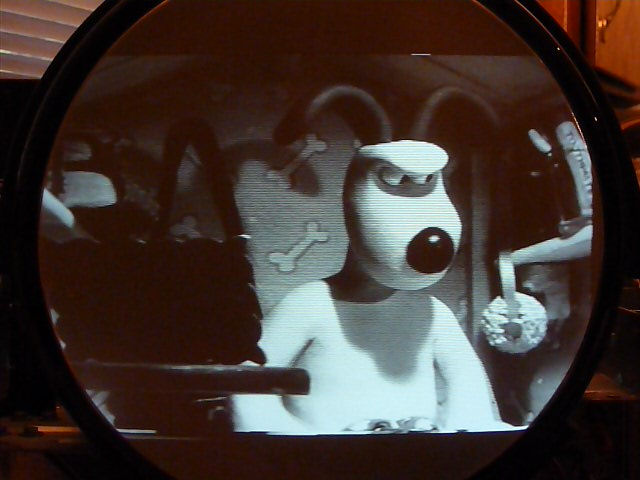 That cabinet looks terrific. Phil
|
|
#75
10-20-2010, 05:52 PM
|
||||
|
||||
|
The Dick Van Dyke show always looks better on a real B/W TV!
You are down to the finish line, now. It's really looking good! Bruce
|
| Audiokarma |
 |
|
|


 Linear Mode

