
|
|
|
#1
 09-13-2007, 08:35 PM
|
||||
|
||||
|
Taking (good) pictures of TV screens
I have tried a lot of different combinations of settings on my Canon A630 camera to show a TV screen set for normal viewing and also show the cabinet and surroundings.
When I adjust the set for watching in a well-lit room, the photo of the screen area usually comes out a bright blob. If I turn down the screen and shoot in a darkened room, the screen looks great but it appears as through the set has a very dim picture (cabinet and surroundings are in the dark). If someone has had success taking pictures with a similar camera, I would like to try the exact settings you are using. I know better results than I am getting are possible. 
|
|
#2
09-13-2007, 09:24 PM
|
||||
|
||||
|
The whole key to getting a good screen shot is to balance the room lighting to the image on the screen.
First, adjust the tv so you have the best quality picture with good contrast. Then, preferably in a room with no natural light (shades drawn) use a lighting system on a dimmer, with indirect light, reflected off the walls and ceiling. Lower the lighting until you have a balance between the room lighting and the image on the tv screen. Do not use a flash, and do not use lighting that shines directly on the tv set. It must be reflected off the walls and ceiling to soften the intensity of the light. You will probably have to shoot at a very slow shutter speed and use a tripod for the camera to hold the camera steady during a slow exposure. If you don't control room lighting you will never be able to balance the amount of light that iluminates the tv set, with the amount of light comming from the crt. Too much room light will wash out the image on the screen, and not enough room light will cause the camera to under expose the surroungs and the tv set. I know it sounds like a lot of work, but good photographs of difficults subjects like a tv screen, need to be properly iluminated. Good luck
__________________
Vacuum tubes are used in Wisconsin to help heat your house. New Web Site under developement ME http://AntiqueTvGuy.com
|
|
#3
09-13-2007, 09:27 PM
|
||||
|
||||
|
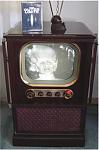
damn grayga, that's an interesting tv. please do not get me interested in collecting those!
anyway, you're pretty close with the second pic, just move the light source a bit closer to the set, you'll have to use a smaller aperture or faster shutter speed and the light from the tube will be darker as well. the idea is to find the correct balance between the tube and the ambient light. looks as though you realize that you need to use a shutter speed below 1/8 sec. so you don't get banding on the screen... nice job! dafarted got in there as i was typing, but basically we're saying the same thing...
__________________
MA-6900, MAC4100, Fisher 400, Sansui AU-719, Sansui TU-719, Pioneer SX-980, Yamaha CR-1000, Yamaha CR-1020, Sansui AU-5900, Sony somethin'. NSM 10s. Dynaco A25XL. AR-3's, large Advents. Small Advents. Wharfdale. KEH.
|
|
#4
09-13-2007, 09:28 PM
|
||||
|
||||
|
On a TV with a light colored tube face, it's very hard to get a simultaneous shot of the picture and the cabinet. Commercial photographers always used a double exposure when it was necessary to advertise "actual tv picture". These days the equivalent is to combine two photos in Photoshop or similar program. The only other possibility is very carefully arranged lighting that lights the cabinet but shields the picture tube.
Don't even think about flash.
|
|
#5
09-13-2007, 10:58 PM
|
||||
|
||||
|
As old_tv_nut says, the best solution is to do a double exposure with a still image on the TV and your camera mounted on a firm tripod.
For the first exposure, you have the TV turned off and lighting arranged for best display of the cabinet. For the second, you turn on the TV -- without moving the camera! -- and adjust the lighting (often very different) for best display on the CRT. You later copy and paste the CRT image into the TV cabinet image, using a program such as Photoshop, Paintshop Pro, etc. You can see a nice example of this at: http://www.radiolaguy.com/images/Admiral20X11pix.jpg As I have learned from experience, it's fiendishly difficult to take a good live picture that accurately represents both the cabinet and the screen. If the cabinet looks good, the picture may be too bright or too dim, or too blue in the case of b/w TVs. If you adjust to get a good screen shot, the cabinet will be too dark, and so on. Phil Nelson Phil's Old Radios http://antiqueradio.org/index.html
|
| Audiokarma |
|
#6
09-15-2007, 10:54 AM
|
||||
|
||||
|
These days, with good compositing being pretty simple to pull off in programs like PhotoShop, the easiest way is just take two separate shots and combine. them. That's what I do. When shooting the screen, do not use ANY lighting. The screen provides incident light and any reflected light from a lighting instrument or even ambient light in the room will hurt, not help.
If you want to take one "real" picture, use a light meter to get a reading from the screen only. Do this in a darkened room. Then set your lighting of the cabinet to produce a proper exposure while maintaining the same light level on the overall shot as the one you read from the screen. You may need to fudge a bit one way or the other to get the best results. Remember that the TV picture is presented on the screen one line at a time. Human persistence of vision (along with the persistence of the P4 phosphor) combines all the lines into a single picture. The camera won't necessarily do that. Make sure to use a slow shutter speed when shooting the screen, at least 1/30 of a second, to allow enough time for a complete video frame to be drawn while the shutter is open. If there's not much motion in the video, a slower shutter speed can sometimes produce even better results. --Dave Sica
|
 |
|
|






 Linear Mode

