
|
|
|
#1
 12-28-2013, 08:34 PM
|
||||
|
||||
|
Taking good pictures of old tvs
Hi Folks
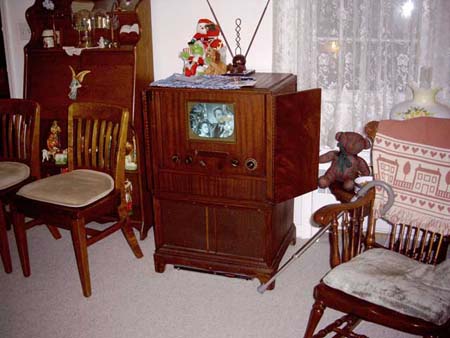
I am hoping some of the members on here can chime in with tips to take good,clear, well lit pictures of their tvs. I have a decent camera on my phone, 13 megapixels, and an ok digital camera but I can't get a decent picture of the tvs. Either too dark , because I am trying g to get a good image from the screen,which makes the cabinets very dark. Too much light and I have good pics of cabinets but can not make anything out on the screen. I see many of you posting great quality pics, so would love to know what type of settings you use when taking pics Thanks! 
|
|
#2
12-28-2013, 11:12 PM
|
||||
|
||||
|
One thing for sure is, do not use a flash. So, good lighting from more than one angle (but not shining or reflecting on the screen) is important.
Some people have done a composite-type picture maybe using Photoshop or a similar program. They have the camera on a tripod or other fixed position, then take the same picture with and without the flash. They combine the lit screen from the non-flash picture with the lit cabinet from the flash version.
__________________
Chris Quote from another forum: "(Antique TV collecting) always seemed to me to be a fringe hobby that only weirdos did."
|
|
#3
12-29-2013, 01:08 AM
|
||||
|
||||
|
I like to use soft light to reduce glare and unwanted reflections. Compact and phone
cameras are limited by auto everything. A SLR on a tripod fully manual will get the best results (spot metering, aperture setting for depth of field , shutter speed , and yes manual focus). Background and setting will give great emphasis to the subject. Here are some of my pictures shown in my postings. Mike. http://www.videokarma.org/showthread.php?t=249544 http://www.videokarma.org/showthread.php?t=249498 http://www.videokarma.org/showthread.php?t=251780
|
|
#4
12-29-2013, 05:30 AM
|
||||
|
||||
|
You need to select a fairly slow shutter speed otherwise you will get just a sampled horizontal section of the picture.
As stated above, do not use flash otherwise you will get reflections and probably wash out the tv picture image. You need to experiment to get correct exposure of the cabinet whilst using a slow shutter speed. This may give rise to a rather overly bright tv picture image so you may need to reduce the brightness and contrast below normal viewing settings. Again, just experiment once you have got a good cabinet exposure. HTH Peter 
__________________
http://www.nostalgiatech.co.uk/Vintagetech.htm https://www.youtube.com/c/PeterScott/videos
|
|
#5
12-29-2013, 12:44 PM
|
||||
|
||||
|
Mike had everything right. Modern auto-everything cameras are the enemy of good TV photos. I use my digital camera constantly, but, to be honest, I took better photos 18 years ago when I launched my website and used a 35mm film camera.
Most people pay far too little attention to lighting. In addition to turning off the flash, I turn off the overhead room lights and use several portable lights to flood the area with ambient (i.e., reflected and non-glaring) light. Backlighting is especially important. If you look at the typical rotten TV photo, you'll see far too much light on the front of the TV and none, or almost none, behind it. As you've already learned, when presented with a bright screen in a comparatively dim background, your auto-everything camera will pick one of the two extremes to set the exposure. If it picks the screen, the screen looks OK and the cabinet (and the rest of the room) is too dark. If it picks the room, the screen is too bright. It may help to decrease the contrast between the screen and the room. That means turning down the screen brightness and "turning up" the ambient lighting everywhere else. Even then, it may be a challenge to force your auto-everything camera to reproduce what our eyes see naturally. When I am feeling impatient (which is most of the time), I simply combine two shots taken with the camera on a tripod. In the first one, the screen is turned off and the room is lit so that the cabinet looks best. In the second one the lighting is optimized to make the screen look best. Then you copy and paste the best screen into the best-cabinet photo. You could consider this a trick photo, but I'm really just compensating for what my stupid "smart" camera does against my wishes. Color is a whole 'nother issue. Indoor lights are typically much yellower than daylight, so when my auto-everything camera adjusts that to make the room look natural, the TV screen becomes too blue. You can minimize this problem by getting bluish light bulbs from a camera shop and using them in floodlights. Or, if you are combining two shots, you can adjust the color balance of the screen portion to match that of the room. Sometimes it's just too much hassle to try to get a single photo that shows both the screen and cabinet at their best. There's nothing wrong with using two photos. To display your beautiful cabinet, leave the TV turned off. To show your TV's beautiful picture, turn down the room lights and zoom in for a closeup of the screen. Phil Nelson Phil's Old Radios http://antiqueradio.org/index.html
|
| Audiokarma |
|
#6
12-29-2013, 03:01 PM
|
||||
|
||||
|
Quote:
|
|
#7
12-29-2013, 03:48 PM
|
||||
|
||||
|
Your digital camera should have a "S" setting which is the adjustable shutter speed mode. Experiment there with shutter speeds and (fake) ASA settings. Slow shutters like 1/30, 1/15 should get you in the neighborhood.
__________________
“Once you eliminate the impossible...whatever remains, no matter how improbable, must be the truth." Sherlock Holmes.
|
|
#8
12-29-2013, 05:53 PM
|
||||
|
||||
|
Basically, I don't think it is possible to take a good picture that shows both a live picture and a nice view of the cabinet. A shot of the screen never looks good unless the black level of the screen is pretty dark. Especially on early TVs with rather light colored phosphor and no glass tinting, this means the actual lighting has to be very low, or near zero.
Getting a nice view of the cabinet, on the other hand, requires that the ambient light combined with the camera setting be sufficient to give a nice grayscale. I would generally say these two are mutually exclusive, and it really isn't possible to take a picture that does justice to both. This surprises people, because our own perception of what we see seems much better than what gets captured by a camera. In reality, our eyes adjust to the black level on the screen giving a perception of it being darker than it really is. The only picture posted above which attempts to show both cabinet and screen is the one by Peter Scott. However, note that the lighting in that case shades the screen very well, so that it would almost be black without an image on the screen. If you can light the cabinet in a manner that does not light up the screen, it will work, but in general, that gives a poor view of the front of the cabinet. Photoshopping, of course, can put a nice picture on a good shot of the cabinet, but I have to admit I don't like them, because it's immediately obvious that the photo is not a genuine single shot. On the other hand, others may find that less objectionable. I simply end up taking two shots -- one of the cabinet (which may or may not include a completely washed-out picture) and one of the screen in low light. Getting a good shot of the screen in low lighting is another challenge. Similar to many of the comments above, I find it's generally a good idea to use a manual setting with a low exposure (set the camera for a dark picture). I also seem to do best with both the brightness and contrast of the set pretty low.
|
|
#9
12-29-2013, 08:26 PM
|
||||
|
||||
|
Also AVOID florescent lighting. If there is much or any of it your camera will synch up to it instead of your TV and you will have a black horizontal bar on your screen shot from the camera taking a picture during the vertical retrace.
__________________
Tom C. Zenith: The quality stays in EVEN after the name falls off! What I want. --> http://www.videokarma.org/showpost.p...62&postcount=4
|
|
#11
01-03-2014, 06:21 PM
|
||||
|
||||
|
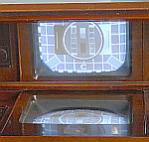
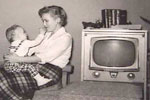
Do a Google search for HDR (High Dynamic Range) photography. Basically, since TVs don't move around much, it's easy to take two shots: one with the exposure optimized for the cabinet and another for the screen, then combine them. But our eyes are used to seeing imperfect photos in this situation and sometimes if it looks too good, even though it's real it can look fake!
|
|
#12
01-04-2014, 08:55 AM
|
||||
|
||||
|
I think Mr. Scott's shot is simply amazing. Of course I am more fascinated by the electronics than the picture quality, which is still great in my opinion.
__________________
"Face piles of trials with smiles, for it riles them to believe that you perceive the web they weave, and keep on thinking free"
|
|
#14
01-04-2014, 10:46 PM
|
||||
|
||||
|
Wa2ise, your pics aren't showing on my computer (IE or Chrome).
|
|
#15
01-04-2014, 10:51 PM
|
||||
|
||||
|
They show here (Opera).
__________________
tvontheporch.com
|
| Audiokarma |
 |
|
|










 Linear Mode

