
|
|
|
#1
 02-14-2016, 02:13 PM
|
||||
|
||||
|
Color TV Screen Shots
I have been perplexed with the problem of getting nice looking screen shots for some time now.
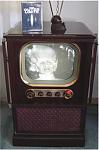
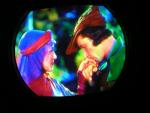
I have discovered that it appears that the camera is too sensitive to the fine detail of the picture. It seems that the human eye has a way of smoothing the imperfections of the fine detail in a tv picture. Perhaps this is due to the human eye having "persistence of vision" (just my guess) What ever the reason, my screen shots have been, in my opinion, un-acceptable to me ever since I started taking screen shots. Over the years I have tried a number of techniques to try and get a smooth looking picture without sacrificing lots of detail. I think I finally found something that seems to work for me. Here is what I am now doing, and maybe it will work for you: set your digital camera so that it takes a picture of at least 1600 x1200 pixels. Mount your camera on a tripod. Using shutter priority mode take an exposure of at least 1 second without a flash. Use as wide an angle with your zoom as possible and move the tripod to a position that takes the full screen plus about another 50% (IE: the frame consists about 2/3 CRT and 1/3 surounding area). Using a DVD player or digital set top box place the source in pause mode for the frame of video you wish to capture. The long 1 second exposure will have a tendency to "blend" or "smooth" the image on the screen as the TV set refreshes the image at 30 frames/second. Now that you have a half way decent image in your digital camera, transfer it to your computer. For the following step I use a program called "IrFanView" This program has a very nice facility for batch re-sizing digital images. Because I take my photos for the purpose of making web pages for my web site, I re-size to make the width of all my photos 800 pixels wide by what ever length they end up. It seems that the act of downsizing from 1600 to 1200 pixels wide has an additional benefit of further smoothing the photo to a point that when it is viewed on a web browser, thee photo doesn't show all the fine hash and imperfections that I was previously getting, and still the photo looks very nice. The overall intent is to have a photo that replicates what our eyes perceive, and I am more pleased with this method than anything I have tried previously. Smaller screens have always been more difficult to photograph due to the fact that the phosphor dots on a small screen are larger with respect to the image size being displayed. ON a large crt the image is composed of more dots, so the image looks smoother. You may want to give this a try next time you are trying to show a screen shot of your color set. With a different camera you may not get the same results I have obtained. I have attached two 800x600 screen shots off of my CT100 demonstrating the difference this method made for me.
__________________
Vacuum tubes are used in Wisconsin to help heat your house. New Web Site under developement ME http://AntiqueTvGuy.com Last edited by ohohyodafarted; 02-14-2016 at 02:17 PM. 
|
|
#3
02-14-2016, 03:06 PM
|
||||
|
||||
|
What about non Wizard of Oz screen shots? Maybe a modern movie perhaps..
__________________
Looking for an all tube or hybrid color TV set from the late 1960s, early 1970s that's in a steal cabinet..
|
|
#5
02-14-2016, 03:48 PM
|
||||
|
||||

Great info, and nice shots, Bob. I have a 14 year old Olympus, and a much newer Nikon. The Nikon tries to "light-average', and takes less than great shots. The old Olympus takes very good shots with few artifacts but with fewer pixels. I'll try some of your suggestions to see if I can manipulate the Nikon somewhat, although it's a rather simple camera, not an SLR. May shoot a roll of decent print film, too. BTW, the avitar is off my CTC-4. A little over saturated.
Kevin
__________________
stromberg6
|
| Audiokarma |
|
#6
02-14-2016, 11:37 PM
|
||||
|
||||
|
Quote:
__________________
Vacuum tubes are used in Wisconsin to help heat your house. New Web Site under developement ME http://AntiqueTvGuy.com
|
|
#7
02-15-2016, 09:12 AM
|
||||
|
||||
|
I use a different technique. First, all of my DCD/BluRay players deface stopped videos with messages on the screen, so I don't do that. I either use a tripod
and OTA broadcasts with a 1/20 or 1/10 sec shutter (and try for no motion) or just play still pictures which are jpgs using my BlyuRay player. I know what size to make them (485x720 or multiples of that) so that the player correctly matches the picture to its digitized NTSC scanning. I use either a Canon 30F or 7D. I always use manual settings except color balance, which it gets right for some reason. This alone is sufficient for B&W TVs. The problem is color dots. There are two ways to handle this. One is to use a tripod and carefully defocus the image so that there is no moire. This is easiest by far on the 7D or any camera which has a live view screen with blow-up to pixel level. The other is to carefully focus so all the spots are just barely blurred but not so that they are blurred outside their own triangle. Then you do the rest of the blurring in Photoshop (Gaussian Blur). There is a real problem with this method: cameras have a tendency to overexpose the spots, especially red. I have to check each time I set up (but not each picture) with the in-camera Histogram. And when I "develop" the raw files in Photoshop, I have to be careful that the conversion of raw to plain RGB format does not also overload some pixels (i.e. reduce exposure when "developing".) With this method after blurring the picture is dim, but that's easy to fix with "levels". With test photos in color, I always use the USB key method. I take the picture, and then when I "develop" them, I always have the same picture on the TV when I do the developing. I match the image on my screen so that it EXACTLY matches the TV, in hue, saturation and contrast. This way, ANYBODY can tell what the TV looks like by comparing the original jpeg and the picture off the TV on their computer. Any differences between their computer monitor and mine cancel!
|
|
#8
02-15-2016, 01:08 PM
|
||||
|
||||
|
WOW! Sounds like your cameras and software are a lot more sophisticated than what I have at my disposal. Guess I will have to make do with my rather low tech method.
What do you mean by the term "develop" Never heard anyone speak of "developing" a digital photo.
__________________
Vacuum tubes are used in Wisconsin to help heat your house. New Web Site under developement ME http://AntiqueTvGuy.com
|
|
#9
02-15-2016, 03:24 PM
|
||||
|
||||
|
Bob, indeed your second screen shot does look very good. Thanks for the tips.
__________________
Chris Quote from another forum: "(Antique TV collecting) always seemed to me to be a fringe hobby that only weirdos did."
|
|
#10
02-15-2016, 04:26 PM
|
||||
|
||||
|
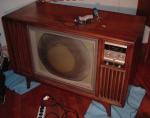
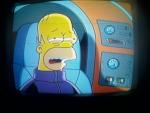
These are all live screen shots with me holding the camera(no DVD pause). Camera is a relatively cheap Kodak C633. All I do is use the auto setting with no zoom. I also turn the TV screen brightness down a tad from normal viewing and snap away. I think these are a reasonable representation of what this set actually looks like in person.
    
|
| Audiokarma |
|
#11
02-15-2016, 08:27 PM
|
||||
|
||||
|
now thats what a roundie should look like!i could watch that set forever
|
|
#13
02-16-2016, 08:24 AM
|
||||
|
||||
|
Quote:
Manipulations you make before this conversion are completely LINEAR which is a big benefit. Also, and even more important .... if the image taken in the camera has color fringes these can be removed most easily. (Point and shoot cameras do this defringing in the camera, which is easy if you don't have interchangeable lenses. That's one reason the point and shoots are so good.)
|
|
#15
02-16-2016, 02:09 PM
|
||||
|
||||
|
All good advice above.
Reasons why: The human visual system has parallel processing for average brightness and details, so you can see that there are color dots or scan lines and still see the average of these with the black spaces in between. Cameras with good resolution see the dots or lines and the black spaces individually, but set exposure according to the average. The lines or dots, if resolved, then get overexposed when the average is normal. The solution is to deliberately underexpose when taking the photo, then blur it slightly by reducing the resolution, and finally adjust the brightness/contrast (actually the level, as stated above). In Irfanview, there is no level control as such, but you can get the same effect by adjusting both contrast and brightness as required. This problem showed up in early kinescope recorders (which made movies off a TV monitor for delayed broadcast) and in electron beam recorders that recorded TV directly to film. This was fixed by careful control of the CRT spot size (line width) and/or quickly wobbling the scan up and down at a very high frequency to fill in the space between scan lines. Regarding lens zoom - in general it is not necessary to use a particularly wide zoom setting. Less geometric distortion will usually be had by using a mid zoom setting and moving the camera to a point where the TV screen fills most but not all of the viewfinder. It may be good to experiment with different zoom settings (filling the viewfinder more or less) to see if some give more or less moire' patterns. Regarding shutter speed: you need 1/30 of a second to capture a full NTSC frame. This is still too fast for good results because the start point and end point of the shutter opening will not be exactly synced to the TV and will show as a light or dark bar across the screen. This bar can be horizontal, diagonal, or other, depending on what sort of shutter mechanism (mechanical or electronic, vertical-moving or horizontal-moving) your camera has. Practically, you need to use 1/15 second or slower. If your camera does not have manual settings, you can fix the dot overexposure by using the exposure compensation, which nearly all cameras do have, and setting it towards darker (minus). Unfortunately, the camera may decide to make this adjustment by shortening the shutter opening to less than 1/15 of a second, which is needed for a good capture of a complete frame (see next paragraph). If your camera does not have manual settings, it will be difficult to get good results, because your camera will set the shutter speed and aperture based on regular scenes, where it tries to stop motion if possible - it doesn't know you need 1/15 of a second for a TV picture. In this case, your experiments with zoom setting are also inadvertently affecting exposure settings because you are changing the percentage of the frame containing relatively bright TV picture vs. dim room surround. You will have to experiment until you find a setup where the camera picks the shutter speed and exposure you need (if you ever do).
|
| Audiokarma |
 |
|
|










 Linear Mode

